

Our mission is to bring you high quality innovative products to enhance your craft experience while providing excellent customer service! The Get-It-Straight™ Laser Square utilizes a patent-pending sliding laser design, allowing you to quickly and easily align multiple objects - perfect for scrapbooking, stamping, quilting, school projects & more. Our Multi-Mat™ works perfectly with the Laser Square. We also have unique stamping options with our Jimbo Logik™ & Duck Commander® stamps!
Showing posts with label Multi-Mat. Show all posts
Showing posts with label Multi-Mat. Show all posts
Saturday, March 14, 2015

Friday, February 27, 2015
Some Days.... Tropical Layout by Debbie Sherman


Some Days.....
Designed by Debbie Sherman
Hi Friends! I'm sharing a layout with you today that I created with the KellyCraft™ Get-It-Straight™ Laser Square & Multi-Mat™ and Jimbo Lojik™ Stamps. If you live in a part of the country where the winters can get long, you start dreaming of places to stick your toes in the sand and relax. Although our winter has been mild, it's still cold and windy and I can't wait for summer!
 We'll start this layout by building the backgrounds with modeling paste, Stencil and Chalk Ink.
  After your modeling paste has dried rub chalk ink over the raised areas with a make-up sponge.
 Now that you have your background built add your matting to the layout using the KellyCraft™ Get-It-Straight™ Laser Square & Multi-Mat™.
I use my photos to line everything up because I normally distress the edges of my matting.
 After I line the photo and matting I draw around it so that I know where they will be placed and I work on the background with Glimmer Mist. Spray it randomly on the stenciled areas allowing it to drip down the page.
 Adhere you mat and photo once again lining it up with the
Stamp your journaling onto a piece of paper lining it up with the
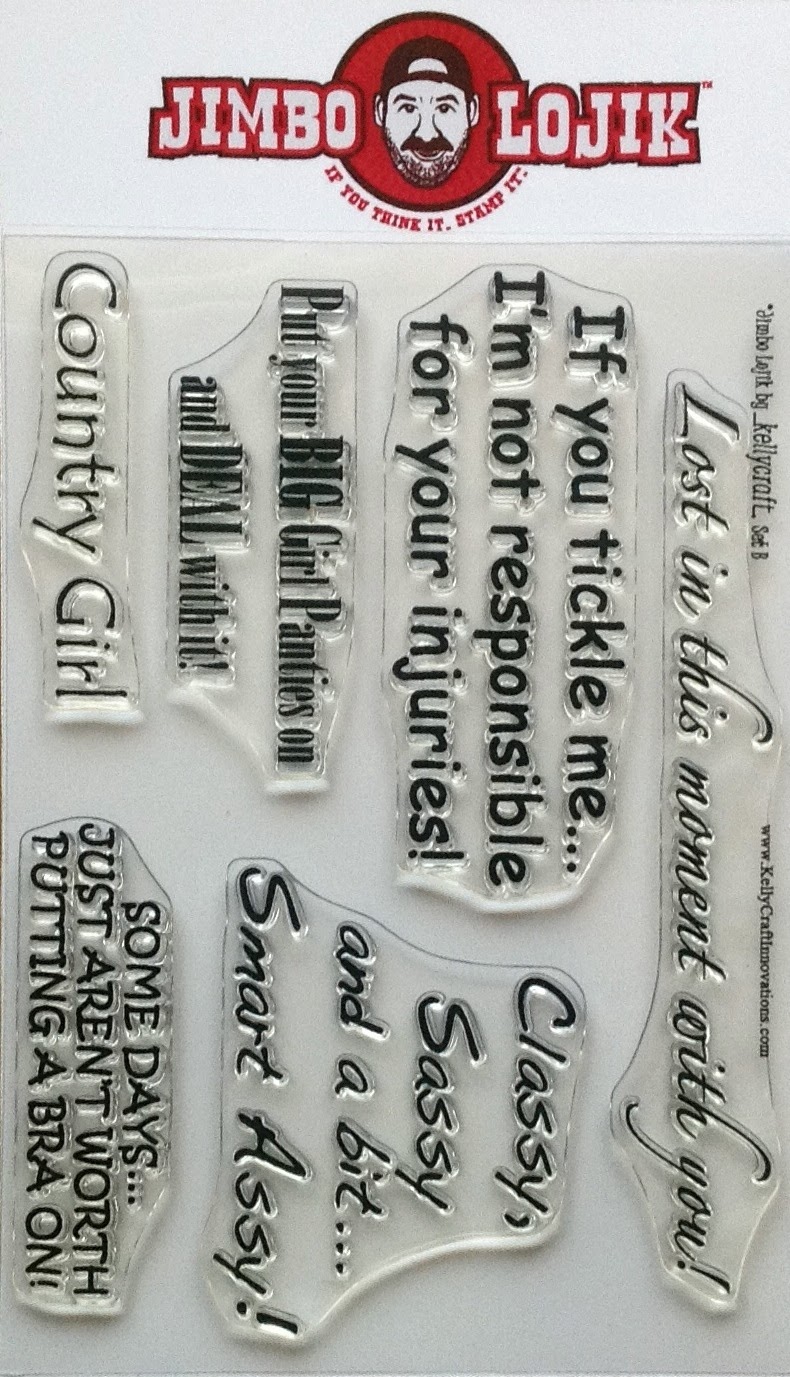
I used a fun stamp by Jimbo Lojik Set B.
Adhere your stamped journaling to your layout.

Add your embellishments, I used some seed beads, flowers and some fish, clam shells, star fish and some twine. The fish are made with Makin's Clay® and painted with DecoArt® Metallic Paint and then brushed with Perfect Pearls.


Hope you enjoyed this layout and are inspired to create your own beachy layout!
Thanks for stopping by the KellyCraft Blog today!
Debbie
Thursday, February 19, 2015
Hangin’ with the KellyCraft Dudes Layout by Candice Windham

Hangin’ with the KellyCraft Dudes
Designed by Candice Windham
Every January, I attend the Craft and Hobby (CHA) convention in Anaheim, California. This is where all the new items in the world of craft creativity are unveiled, where new uses for the older ones are shown and where I get to hang out with people who think like me.
Some of the people who think like me are the folks from KellyCraft™, Aaron and Jimbo. They premiered the KellyCraft™ Get-it-Straight™ Laser Square the first time I met them at CHA several years ago, and they have been coming up with something new every year since. (If you don’t have a KellyCraft™ Get-it-Straight™ Laser Square and the Multi-Mat™ Docking Station, you need one! See the special offer here.) This year was no different with their exclusive line of Duck Commander® stamps. These great stamps come in both red rubber and clear polymer and feature the Robertsons, the first family of duck calls.
This year’s CHA KellyCraft™ booth featured a photo station, so how could I not have my pic made with Willie and Si Robertson? The only problem is that I wasn’t wearing camo, so I stuck out like a sore thumb… kind of like Si’s tea glass. At least we were both the same color.
Here’s how I created this scrapbook page:
Supplies:
KellyCraft - Get-it-Straight™ Laser Square
- Multi-Mat™
- Duck Commander® Clear Polymer Stamps, Set 1
Clear acrylic block
Card Stock, one 12” x 12” sheet, two 12” x 4” pieces and two 8 ½” x 11” pieces
Spellbinders® - Grand Nestabilities Dies, Set LF-190
- Grande Calibur
Viva Decor Pearl Pens, bronze and gold
Ranger Distress Ink Pads, Scattered Straw, Pine Needles, Vintage Photo and Broken China
Tags, three small, one medium and one large
French General Cording, Brown
Kool Tak - Foam Squares
- Premium Extreme Adhesive
- Artist’s Tape
Marvy Brown marker
Printed photo
Hole punch, ¼”
Scissors
Instructions:
Note: All pieces are sponged with Vintage Photo ink along the edges.
Note 2: In step 1, the page is set slightly outside the Multi-Mat™ Guide top allow for the Acrylic block, so the center is actually at 6 1/4”
 1. Line up your background paper one the Get-it-Straight™ Laser Square and Docking
2. Repeat this process in the empty spaces with the Happy, Happy, Happy stamp and Scattered Straw ink. Set aside.

3. Die-cut the photo using the second-largest image in the Spellbinders Grand Nestabilities set and die-cut the card stock backing with the largest die. Adhere these pieces together using Kool Tak Premium Extreme Adhesive. Punch holes either side of the photo and run brown cording through each hole.
4. Apply Kool Tak Foam Squares to the back of the photo mat and adhere it to the stamped page, using the Get-it-Straight™ Laser Square. Wrap the cord to the back of the page and adhere it in place with Kool Tak Artist’s Tape.

 5. Holding the two pieces of 12” x 4” card stock together cut one edge to mimic grass. Flip one piece over so the grass pieces don’t line up perfectly and ink both pieces with several ink colors.
 Tip: When you don’t have the color of card stock you need, find a similar or lighter shade and ink it to match with one or more of the inks you are using on the page. It may not be perfect, but it will look just fine.
6. Adhere the first piece of card stock to the bottom of the page. Adhere the second, placing it about ½” below the first, and then trim off the excess on the bottom of the page.

7. Trim three tags to fit the area above the photo. Sponge the tags
with Vintage Photo, Scattered Straw, Pine  Needles and Broken China. Using the brown marker, ink one word
 at a time on the Happy, Happy, Happy stamp and stamp it on the tag. Repeat with the other two tags. Tie each with a knot on the brown cord and use the KellyCraft Get-it-Straight Laser Square to line up the tags, keeping the center tag straight and angling the other two. Wrap the excess cord to the back at each corner and secure with Kool Tak Artist’s Tape.
8. Ink the largest tag with all the inks. Sponge the edges of the medium tag with Vintage Photo and tie the two together. Write your sentiment on the medium tag, and then tie them to the cord at the top of the page. Place a little adhesive on the back of each tag to hold it in place.
9. For the finishing touches, apply dots of the Pearl Pens over the entire page and then scribble along the bottom to mimic weeds.
With my KellyCraft™ products, I am assured of good stamped images and nice, straight lines with no effort on my part. I’m also assured of a great memory from CHA 2015!
Wednesday, February 11, 2015
Happy Easter! Layout by Kristina Beagle

Happy Easter!
Designed by Kristina Beagle
Can you believe how fast this year is already going by!! Easter is going to be here before you know it so I thought I’d get a jump on my Easter projects! I got some fun new Doodlebug paper this weekend that I knew would be perfect for this layout Idea so I busted out my Cricut and cut the cutest Easter embellishments, and then grabbed my Kelly Craft Get-It-Straight Laser square and got to work.
Materials:
KellyCraft™ Get-It-Straight™ Laser Square & Multi-Mat™
MISTI Stamp Tool
Sizzix® Big Shot, Framelits “Click Click”
Wendi Vechi Embossing Paste
Doodlebug Chevron 12"x12"
DCWV Pastels 12"x12"
Versa Fine Onyx Black Ink
Cricut Explore; Cricut Classroom: April and May; Cricut: Easter Magic; Cricut: Create a Critter
Instructions:
1. I started out with a 12x12 base on DCWV pastel purple cardstock and some Chevron stripped Doodlebug Glitter cardstock which I trimmed to 8.5" tall.

 2. After lining that up where I wanted it, I used the the Get-It-Straight™Laser Square & Multi-Mat™ to mark my place, so I could adhere a strip of Washi tape directly above where the paper would lay.
3. After laying the strip of Washi I adhered the Chevron piece of
paper, and masked off both so I could do some embossing paste stenciling.

 4. After that dried, I began assembling my page by placing down a little easter egg border, cut from Cricut to serve as a base for my photos.
5. I placed my two small photos, then aligned with the Get-It
Straight™ Laser Square, and adhered with some foam squares.
6. I finished the page off with an off-set 4x6 photo and assorted Easter die cuts.
Friday, January 23, 2015
Come Sit by Me Card by Martha Lucia Gomez

Come Sit By Me!
Designed by Martha Lucia Gomez
Materials:

- Multi-Mat™
- Jimbo Lojik™ Stamp Set J
Stampin Up - Card Stock Very Vanilla and Raspberry Ripple, Modern Mosaic Embossing Folder
Sizzix BigShot
Memento Black Tuxedo Ink Quick Quotes
PowerPuff Chalk Ink Razzberry
Ranger- Distress Ink Antique Linen, Distress Ink Victorian Velvet, Blending Tool
Snail Adhesive
Dimensionals
Glue Dots
Bella Blvd. Feathers
Instructions:
1. Cut all the pieces to build the card. The size of the card is a regular size 5-1/2"x4-1/4". The second layer is 5-1/4" x4" the third is 5"x1-1/2."
2. Create the embossing for the second layer using the Modern Mosaic Embossing Folder and your Big Shot.

3. Paste this layer directly over your card base aligning this with the Get-It-Straight™ Laser Square.
 4. Ink you stamp with Memento Black Ink and use Get-it-Straight™ Laser Square to align and stamp your message.
5. Put some dimensionals behind your message and use Get-it-Straight™ Laser Square to align and paste this on the bottom part.
6. Now using a chipboard piece to finalize the decoration of the card . First ink the entire piece with a neutral color of Distress Ink like Antique Linen, then stamp a main image with another color and finally ink the borders with PowderPuff Chalk Ink Razzberry from Quick Quotes.

 7. Take a green Feather from Bella Blvd and use a glue dot to paste it behind the chair. Attach the
 chair to the card and give it your personal touch.
I hope you liked the project and come back soon for more inspiration!
Tuesday, January 13, 2015
Happy Happy Happy Birthday Layout by Kristina Beagle

Happy, Happy, Happy Birthday Layout
by Kristina Beagle
Today we have a quick and simple scrapbook page showing the fun versatility of the Duck Commander® stamps!
Materials:
.jpg)
KellyCraft™ - Get-it-Straight™ Laser Square
- Multi-Mat™
- Duck Commander® Wood - Happy Happy Happy
DCWV; Silky Smooth cardstock
Versa Magic ink pad
A La Mode; Pink embossing powder
Cricut Explore
Miss Kate Cuttables; Birthday Cupcake cuts
Versa Magic ink pad
A La Mode; Pink embossing powder
Cricut Explore
Miss Kate Cuttables; Birthday Cupcake cuts
Instructions:

1. I started with my base 12x12 sheet of cardstock and found matching pieces to coordinate. As always, I began by cutting mats for my 4x6 photos onto some 4 ¼ x 6 ¼ inch mats.
 2. Next I cut a 12x3 inch strip of neutral cardstock to tone down the background and later provide a space to mount my embellishments and title, and aligned and adhered with my Get-it-Straight™ Laser Square
3. I then cut a 9x7 base for my photos, lined up with my Get-it-Straight™ Laser Square and adhered to the page.

4. Next I aligned and adhered my photo mats and photos. I typically adhere my photos onto their mats first, then the page, but now have found it easier to do the opposite and line them up with the Get-it-Straight™ Laser Square after the mats are on the page.
 5. To finish the page off, I stamped & embossed my sentiment onto a 1 inch circle punch from the same brown cardstock used earlier, and added my title & embellishments previously die-cut.
Wednesday, January 7, 2015
DUCKMEN Layout by Kristin Kelly

DUCKMEN!
Designed By Kristin Kelly
Sitting in the water in the cold doesn't sound like a good time to me, but it's just what these hunters needed to find some ducks and have a great hunting trip. And KellyCraft™ helped to record those memories.
Materials:

- Duck Commander clear stamp sets 1 & 2
CTMH Pure Adventure stamp set
Paper Loft Huckleberry Pond and Back Country papers
CTMH Timberline paper and cardstocks
Cricut Art Philosophy cartridge
CTMH and ColorBox inks
Scotch ATG
Glue Dots
Pop Dots
Instructions:

2. Next, using your Get-It-Straight Laser Square, attach the large circle. Then turn your layout and attach your strips.
And attach your mats and photo.


 3. Now, using a sanding block, sand an area on your photo about 2 1/2" x 1/2". Then use your Get-It-Straight™ Laser Square to stamp 'Duckmen' on the photo using ColorBox Bark ink.
Then adhere to your layout.
4. Next, on the Cricut, cut 2 ovals 1 1/2" and 1 3/4", 2 tags 2 1/2" and 2 3/4" and multiple

Make the shotgun shells by cutting 3/4" off the bronze rectangles and applying to one end of the green and red rectangles and trimming the sides. Attach to layout, some flat and some with Pop Dots.
Attach ovals and place on layout using Pop Dots. Cut a small circle and place an eyelet in the middle to look like a shotgun shell. Attach to your tags and then to the layout using Pop Dots.
5. Finally, stamp a few ducks in the top corner.
Now, not only was their shooting straight, but the guys have a Get-It-Straight™ layout to remember their trip courtesy of KellyCraft™.
Friday, January 2, 2015
"Some Day's Aren't Worth Putting a Bra On!" Card by Cindi Bisson

"Some Day's Aren't Worth Putting a Bra On!"
Designed By Cindi Bisson
Materials:
KellyCraft™ - Get-it-Straight™ Laser Square
- Multi-Mat™
- Jimbo Lojik™ Set B
Brick red, tan parchment card stock
Graphic 45® Domestic Goddess paper collection
Clearsnap® ColorBox® Archival Dye ink pad - Suede
Grey velvet 1/4 ribbon
Grey vellum flower photo corners
Aleene's® Quick Dry Tacky Glue®
Westcott® Titanium Bonded Scissors, TrimAir Trimmer
 Instructions:
1) Cut brick red card stock to 9" x 5 3/4". Fold in half to form card.

2) Ink verse with Suede ink. Use Get-it-Straight™ Laser Square to align and stamp verse on tan parchment card stock. Ink edges of verse with Suede ink pad. Cut brick card stock mat for verse. Mount. Add flower photo corner to upper left an lower right corners.
3) Cut patterned paper to 5 1/2" x 4".
4) Use Get-it-Straight™ Laser Square to align and mount centered on patterned paper. Add grey vellum flower accents around verse.

6) Mount grey velvet ribbon around patterned paper, using Get-it-Straight™ Laser Square to ensure ribbon is straight.
Subscribe to:
Posts (Atom)